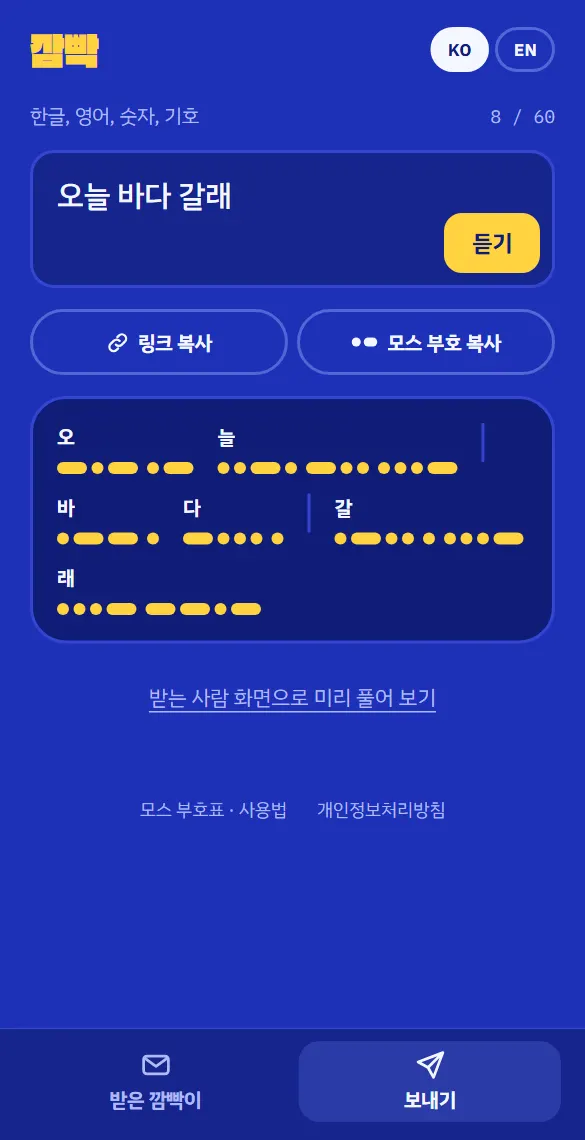
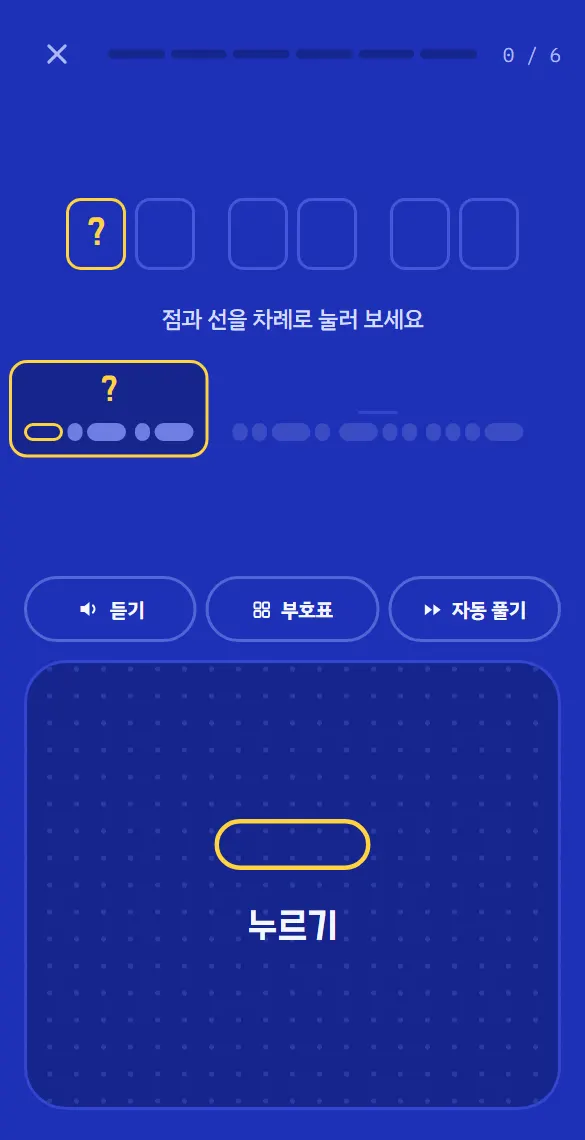
깜빡에서는 메시지 하나를 ‘깜빡이’라고 불러요. 보내는 사람은 최대 60자까지 쓰고, 링크나 모스 부호 텍스트로 복사해 카카오톡이나 문자로 보내요. 받는 사람은 링크를 열면 바로 풀기 화면이 떠요. 큰 신호 키를 짧게 톡 누르면 점, 길게 꾹 누르면 선이고, 자모가 하나씩 맞을 때마다 글자가 조금씩 완성돼요(ㄴ → 느 → 늘).
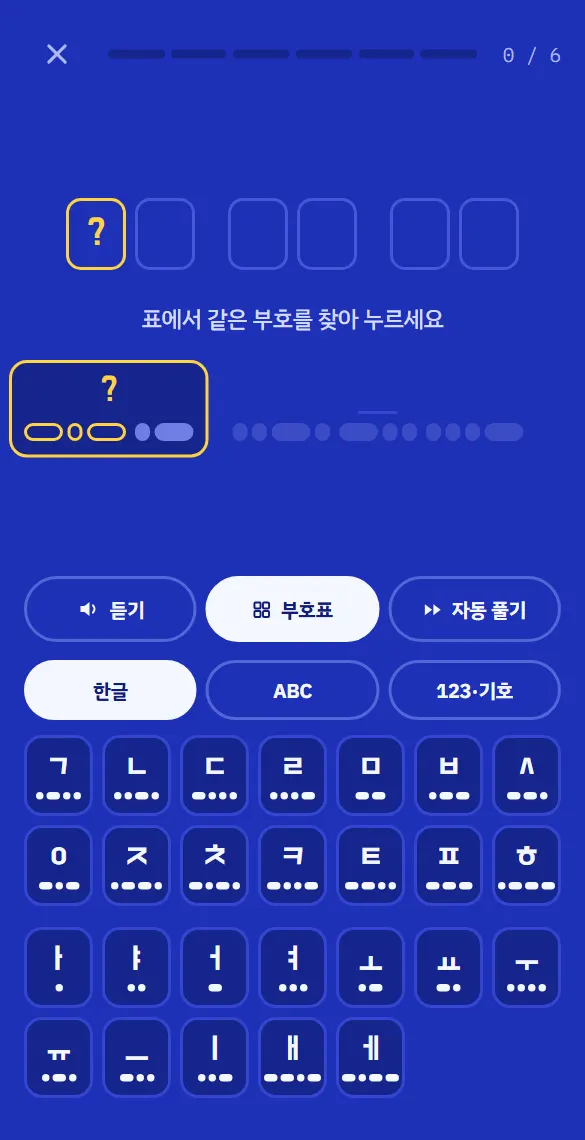
한글 모스 부호는 글자를 자음과 모음으로 쪼개 보내요. 자음 14개와 모음 12개, 26개의 부호를 처음 보는 사람도 풀 수 있게, 풀기 화면에서 부호표를 켜고 표에서 같은 부호를 골라 풀 수도 있어요. 전체 부호표와 외우는 요령은 한글 모스 부호 가이드에 정리해 두었어요.
주요 기능
보내기한글, 영어, 숫자, 기호로 60자까지. 쓰는 대로 모스 부호 미리보기가 보이고, “듣기”로 소리를 들어 볼 수 있어요. “링크 복사”와 “모스 부호 복사” 두 가지로 보낼 수 있어요.
받는 사람 화면으로 미리 풀기보내기 전에 상대가 볼 풀기 화면을 직접 해 볼 수 있어요.
풀기신호 키를 0.22초보다 짧게 누르면 점, 그 이상이면 선. 선을 누르는 동안 칸이 차올라서 언제 손을 떼야 하는지 보여요. 틀리면 더 짧게, 더 길게 누르라는 힌트가 나와요.
부호표·듣기·자동 풀기부호표에서 골라 풀거나, 지금 글자를 들어 보거나, 남은 부분을 1×·2×·5×·10× 속도로 자동으로 풀 수 있어요.
정확도와 답장다 풀면 정확도가 나오고, “답장 쓰기”로 바로 답장할 수 있어요.
받은 기록이 기기에서 받은 깜빡이를 최근 50개까지 기억하고, 어디까지 풀었는지도 이어서 볼 수 있어요.
한글과 영어 섞기한글과 영어는 같은 부호를 나눠 쓰기 때문에, 깜빡은 언어가 바뀌는 자리에 전환 부호를 넣어 섞인 메시지도 정확하게 풀어요.
이렇게 써요
깜빡을 열고 아래 탭에서 “보내기”를 눌러 메시지를 써요.
“링크 복사”를 눌러 친구에게 보내요.
친구가 링크를 열면 풀기 화면이 바로 떠요. 점은 톡, 선은 꾹 눌러 한 글자씩 풀어요.
다 풀면 “답장 쓰기”로 깜빡이를 돌려보내요.
자주 묻는 질문
메시지가 서버에 저장되나요?
아니요. 깜빡 링크는 메시지를 주소의 # 뒤에 담아요. 주소의 이 부분은 브라우저가 서버로 보내지 않아서, 메시지는 주고받는 두 기기에만 있어요.
그럼 암호인가요?
재미로 숨긴 거지 암호화는 아니에요. 링크를 가진 사람은 누구나 풀 수 있으니 비밀번호 같은 중요한 정보는 보내지 마세요.
카카오톡 미리보기에 내용이 보이나요?
아니요. 모든 깜빡이 링크의 미리보기가 똑같아서 내용이 드러나지 않아요.
모스 부호를 몰라도 되나요?
네. 풀기 화면에서 부호표를 켜고 같은 모양을 찾아 고르면 돼요. 막히면 자동 풀기를 써도 돼요.
다른 곳에서 만든 모스 부호도 풀 수 있나요?
네. 점과 선으로 된 부호를 받은 깜빡이 칸에 붙여넣고 “풀기”를 누르면 돼요. 전환 부호가 없으면 한글 음절이 되는지 보고 한글인지 영어인지 판단하고, 한글/ABC 스위치로 직접 바꿀 수도 있어요.
개인정보와 데이터
깜빡에는 계정이 없고, 메시지는 서버로 가지 않아요. 받은 기록은 그 기기의 브라우저에만 저장돼서, 브라우저 데이터를 지우면 함께 사라져요. hbc studio 전체 서비스에 적용되는 개인정보처리방침을 따라요.
Instead of just texting “want to go to the sea today?”, send it in dots and dashes. Whoever gets the link has to key it out letter by letter on a signal key before they can read it. No sign-up, nothing to install.
Send: the Morse appears as you typeDecode: tap for a dot, hold for a dashDecode by picking from the chart
Platform
Web (blinker.honeybeecook.com), made for phones
Sign-up
None. There are no accounts at all.
Characters
Korean, letters A–Z, digits 0–9 and 17 symbols
Languages
Korean, English
What it is
A message in Blinker is called a blink. The sender writes up to 60 characters and copies it as a link or as Morse text to send by KakaoTalk or text. The receiver opens the link and lands straight on the decoding screen: tap the big key quickly for a dot, hold it for a dash, and each correct jamo builds the syllable a little more (ㄴ → 느 → 늘).
Korean Morse code splits every syllable into its consonants and vowels, with 26 codes in all. So that anyone can decode, you can open the code chart on the decoding screen and pick the matching code instead of keying it. The full chart and tips for learning it are in the Korean Morse code guide.
Features
SendUp to 60 characters of Korean, English, numbers and symbols, with a live Morse preview and a Listen button. Copy it as a link or as Morse text.
Try it as the recipientDecode your own blink before you send it, exactly as they’ll see it.
DecodePress for less than 0.22 seconds for a dot, longer for a dash. A dash fills its box while you hold, and a miss gets a hint to press shorter or longer.
Chart, listen, auto-decodePick codes from the chart, hear the current character, or let auto-decode finish it at 1×, 2×, 5× or 10×.
Accuracy and replySee your accuracy at the end and reply with a blink of your own.
HistoryThe last 50 blinks received on a device, with how far you got in each.
Mixed Korean and EnglishKorean and English share the same codes, so Blinker adds switch codes where the language changes and mixed messages decode exactly.
How to use it
Open Blinker, tap Send at the bottom and write your message.
Tap Copy link and send it to a friend.
When they open it, decoding starts right away: tap for dots, hold for dashes.
When they’re done, Reply sends a blink back.
FAQ
Are messages stored on a server?
No. A Blinker link carries the message after the # in its address, a part browsers never send to the server, so the message only exists on the two devices.
So is it encrypted?
No, it’s hidden for fun. Anyone with the link can decode it, so don’t send passwords or anything sensitive.
Does the KakaoTalk preview show the message?
No. Every blink link shows the same preview.
Do I need to know Morse code?
No. Open the chart while decoding and pick the matching shapes, or use auto-decode if you get stuck.
Can it decode Morse made elsewhere?
Yes. Paste dots and dashes into the Received box and tap Decode. Without switch codes it decides between Korean and English by whether the codes form Korean syllables, and a 한글/ABC switch lets you choose.
Privacy and data
Blinker has no accounts and messages never go to the server. History is kept only in your browser on that device and disappears if you clear browser data. The privacy policy that covers all hbc studio services applies.